Floats, bfloat, and how bits shape model memory
A neural network stores learned parameters, including weights and biases. Parameter count multiplied by bytes per parameter gives the memory needed for those parameters. Runtime memory also includes activations, temporary buffers, and, depending on the workload, caches or training state.
Take the small network we trained in the MNIST article — a dense classifier with two Keras Dense layers: 784 flattened pixel inputs feed into a 128-neuron hidden layer, which feeds into a 10-neuron output layer (one per digit).
The shorthand for this shape is 784 → 128 → 10, where 784 is the input size, not a layer. The parameter count adds up to:
With the default fp32 policy, these parameters occupy 407,080 bytes: about 407 KB, or 398 KiB. This excludes the other memory used by a running model.
Model repositories often include a model card describing the model and its training. Weight-file metadata can also show parameter counts and storage dtypes.
The screenshot below shows the Hugging Face sidebar for PaddleOCR-VL-1.5, with a rounded parameter count and the listed tensor type:
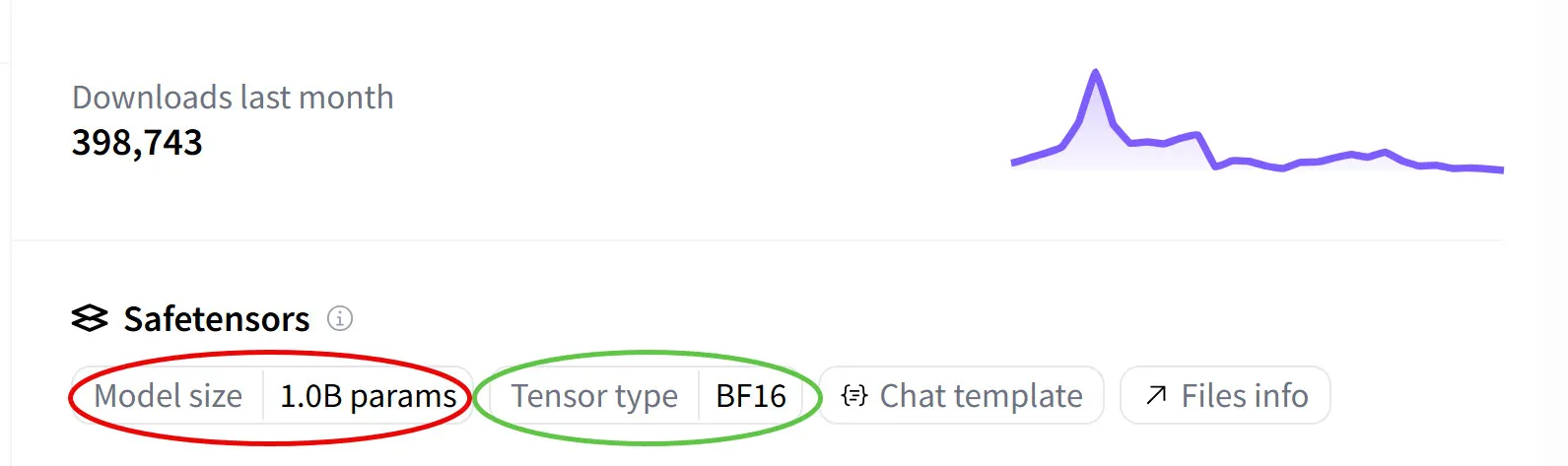
Model size reports a parameter count. Tensor type reports a storage dtype, short for data type. A tensor’s dtype describes its elements, such as float32, int8, or bfloat16; Python’s type() describes the object itself.
In code, inspect .dtype; the printed representation differs between libraries:
>>> import torch
>>> torch.tensor([0.5], dtype=torch.bfloat16).dtype
torch.bfloat16

>>> import numpy as np
>>> np.array([0.5], dtype=np.float16).dtype
dtype('float16')
Hugging Face reads the same information straight from the safetensors file — safetensors is Hugging Face’s file format for saving and distributing trained model weights, and the dtype of each tensor is stored in its metadata, which is what the sidebar displays as “Tensor type”.
BF16 denotes bfloat16, a 16-bit floating-point format developed at Google. It uses the same sign/exponent/fraction structure as the other formats below, with a different bit allocation from IEEE binary16. A checkpoint can contain tensors with more than one dtype, so inspect its metadata when you need an exact memory count.
So the steps to compute the model’s memory footprint are the same ones we used for MNIST, just with bigger numbers. The 1.0B figure is the sum of parameters across every layer of the model — the same per-layer arithmetic we did by hand for MNIST, except Hugging Face has already done it for us by walking every tensor in the safetensors file and adding up the element counts.
So the card says 1 billion params (“B” is shorthand for billion, ). Multiply that by 2 bytes per bf16 weight and we get the model’s weight footprint:
This estimates weight storage only. Inference also needs activations, workspaces, and sometimes a KV cache, which can become a major cost with long sequences or large batches. Training additionally needs gradients, optimizer state, and saved activations.
For a 7B-parameter model, weights alone take about 28 GB in fp32, 14 GB in fp16/bf16, or 7 GB in int8 before quantization metadata. A 70B model needs about 140 GB for fp16 weights. Whether either model fits on a device also depends on its other memory requirements.
Reducing precision can lower weight storage: fp16 and bf16 use half as many bytes as fp32, while 8-bit or 4-bit quantization compresses further. Quality and speed depend on the model, conversion method, and hardware; they need to be measured.
Not every number in a network is a weight
A running network uses several kinds of tensors. The backpropagation article explains where parameters, activations, and gradients come from.
Weights and activations occur in both inference and training. During inference, intermediate tensors can be released when no later operation needs them, although residual connections and workspaces may keep several tensors alive. Training usually saves activations for backpropagation; checkpointing can trade some of that memory for recomputation. Activations need not use the same dtype as weights.
At inference, transformer-based LLMs also carry a KV cache — keys and values cached across past tokens during autoregressive generation, so attention doesn’t have to recompute them for every new token. Often kept in fp16 or fp8 to save memory across long contexts.
During training, two more categories enter the picture:
- Gradients record how the loss changes with each parameter. Their magnitudes can vary widely, making numeric range important.
- Optimizer state depends on the optimizer. Adam keeps two running statistics per parameter; their storage dtype depends on the implementation and precision policy.
In code, dtype lives in a few specific places. Here’s the relevant excerpt from our training MNIST article:
# Input data — explicitly cast to float32
X_train = train_images.reshape(-1, 784).astype("float32") / 255.0

# Model — Dense layers default to fp32 for weights and biases (no dtype= passed)
model = keras.Sequential([
    keras.layers.Dense(128, activation="relu", input_shape=(784,)),
    keras.layers.Dense(10, activation="softmax"),
])

# Optimizer — owns its own state, allocated separately
model.compile(
    optimizer=keras.optimizers.SGD(learning_rate=0.1),
    loss="sparse_categorical_crossentropy",
    metrics=["accuracy"],
)
.astype("float32") sets the input array’s dtype. Keras layers have their own variable and compute dtypes, which determine parameter storage and computation. Here the default policy uses fp32 for both. You can set a different policy per layer:
# Same architecture, but weights and biases stored in bf16
model = keras.Sequential([
    keras.layers.Dense(128, activation="relu", input_shape=(784,), dtype="bfloat16"),
    keras.layers.Dense(10, activation="softmax", dtype="bfloat16"),
])
# PyTorch equivalent — nn.Linear takes the dtype directly
model = nn.Sequential(
nn.Linear(784, 128, dtype=torch.bfloat16),
nn.ReLU(),
nn.Linear(128, 10, dtype=torch.bfloat16),
)In Keras, dtype="bfloat16" sets both variable and compute dtypes. A mixed-precision policy such as "mixed_bfloat16" instead keeps variables in fp32 while using bf16 for computation. In PyTorch, the constructor sets parameter storage; inputs and operations must be compatible, or handled by autocast. Gradient and optimizer-state dtypes also depend on the implementation, so they cannot be inferred independently from the layer setting.
Mixed precision uses different numeric formats for different operations or storage roles. In this article, “bf16 model” refers to weight storage unless stated otherwise.
One mixed-precision Adam arrangement uses 16 bytes per parameter before activations:
- bf16 weights: 2 bytes
- bf16 gradients: 2 bytes (same shape as weights)
- fp32 Adam moments: 8 bytes (two moments × 4 bytes each)
- fp32 master weight copy (kept by the optimizer for stable updates): 4 bytes
Under these assumptions, parameter-related training storage is eight times the bf16 weight storage. This is an accounting example, not a fixed requirement: master copies, gradient dtypes, optimizer variants, and sharding change the total. Activations add a workload-dependent cost.
For 7B parameters, this arrangement needs about 112 GB plus activations and buffers, compared with 14 GB for bf16 weights alone. Full training can reduce device memory through sharding or offloading; adapter fine-tuning changes the accounting by training only a subset of parameters.
Python and JavaScript floating-point defaults
Before looking at the numeric formats ML actually uses, it helps to start with the familiar number types we already use every day in Python and JavaScript:
| Language | Kind | Type | Details |
|---|---|---|---|
| Python | Integer (no decimals, exact) | int | Arbitrary-precision. CPython grows the backing storage as needed, so 2**1000 just works and the result is exact. |
| Float (64-bit IEEE-754 double) | float | The same format we’ll spend the rest of the article unpacking. The numeric payload uses 8 bytes; the Python object needs additional storage. | |
| JavaScript | Integer (no decimals, exact) | BigInt | Arbitrary-precision integer, added later as a separate type. Written with an n suffix (e.g. 5n). The closest equivalent to Python’s int. |
| Float (64-bit IEEE-754 double) | Number | The same format as Python’s float. JavaScript uses it for both integers and fractions; there is no separate integer type by default. |
Python’s float on typical CPython builds and JavaScript’s Number use IEEE binary64. That explains their shared representation of 0.1 and the result 0.1 + 0.2 = 0.30000000000000004. Language-level behavior still differs: Python division by zero raises an exception, while JavaScript can return infinity. Object storage also adds overhead beyond the eight-byte numeric payload.
The mechanics of how those 64 bits split into sign, exponent, and mantissa, why the exponent is stored with a bias instead of two’s complement, and how 0.1 rounds — I cover in detail in earlier articles in this series. Everything there applies directly to both languages, because it’s all the same 64-bit format underneath.
Ordinary floating-point literals use these defaults. Explicit arrays and tensors offer other storage formats; JavaScript also provides Float32Array. ML frameworks add formats such as bf16 and low-bit quantized representations.
How conversions lose bits: from language floats to ML dtypes
Whenever a value moves from one numeric format to another — Python’s float to int, a float to an int8, an fp64 to an fp16 — there’s a chance the bits don’t fit. Something has to give, and where the missing bits go depends on the source and target formats.
The simplest case is float → int: drop everything past the radix point.
>>> int(3.7)
3
>>> int(-3.7)
-3               # truncates toward zero — drops the fractional bits
>>> import math
>>> math.floor(-3.7)
-4               # floor rounds toward -infinity instead
A useful way to understand truncation is to reconstruct the binary value and discard its fractional part. The actual conversion instructions depend on the implementation.
For example, take 5.75. In binary that’s 101.11 — three bits before the radix point (101 = 4 + 1 = 5) and two after (.11 = 0.5 + 0.25 = 0.75). IEEE-754 doesn’t store it that way, though; it normalizes the number so there’s exactly one 1 before the radix point, and remembers the shift in the exponent:
   101.11   →   1.0111 × 2^2
   ^^^ ^^       ^ ^^^^   ^
   │   │        │ │      └── exponent: how far to shift the radix back
   │   │        │ └───────── mantissa (fractional part of the 1.xxx form)
   │   │        └─────────── the implicit leading 1 (not stored)
   │   └──────────────────── original fractional bits
   └──────────────────────── original integer bits
The stored fraction begins with 0111, and the unbiased exponent is 2. Restoring the implicit leading 1 and shifting the binary point explains the integer conversion:
   mantissa:    1.0111
   shift by 2:  101.11
                ^^^ ^^
                │   └── fractional bits → discarded
                └────── integer bits    → 101 = 5
Dropping .11 removes 0.75, so int(5.75) returns 5. This is rounding toward zero, also called truncation, rather than rounding to the nearest integer. Hence int(-3.7) returns -3.
Conversions to narrower dtypes can truncate, round, overflow, or raise an error. The API matters: a constructor can reject an out-of-range integer even when casting an existing tensor wraps it.
>>> torch.tensor([3.7, -3.7], dtype=torch.int8)       # float → int, truncates toward zero
tensor([3, -3], dtype=torch.int8)                     # → fractional bits dropped on each element

>>> torch.tensor([1000, 1001], dtype=torch.int64).to(torch.int8)      # int → int8, overflows (int8 max is 127)
tensor([-24, -23], dtype=torch.int8)                  # → low 8 bits kept, neighbours wrap together

>>> torch.tensor([1e5, -1e10], dtype=torch.float16)   # fp64 → fp16, overflows (fp16 max is ~65504)
tensor([inf, -inf], dtype=torch.float16)              # → saturate to ±inf; magnitudes are lost

>>> torch.tensor([2**24 + 1, 2**24 + 2], dtype=torch.float32)  # int → fp32, exceeds mantissa precision
tensor([16777216., 16777218.], dtype=torch.float32)            # → +1 rounds away (24-bit mantissa); +2 is exact
These examples illustrate four conversion outcomes:
| Pattern | From | To | Example | Result |
|---|---|---|---|---|
| Truncation | float | int | 3.7 → int8 | 3 |
| Wrap-around | int | narrower int | 1000 → int8 | -24 |
| Saturation to infinity | float | narrower float | 1e5 → fp16 | inf |
| Precision loss | int | float | 2^24 + 1 → fp32 | 2^24 |
Wrap-around. Casting an existing integer tensor to int8 keeps its low eight bits. Thus 1000 becomes -24 in two’s complement. This does not mean every constructor accepts out-of-range input.
Floating-point overflow. With round-to-nearest, converting 1e5 to fp16 produces inf, since fp16’s largest finite value is 65,504. Other rounding modes can produce different overflow results.
Precision loss. 2^24 + 1 → fp32 becomes 2^24. fp32’s mantissa is 24 bits (23 explicit + 1 implicit), so every integer from 0 to 2^24 (16,777,216) is exactly representable, but beyond that the spacing between representable values doubles every power of 2. The integer 2^24 + 1 falls between two representable fp32 values and gets rounded to the nearer one (2^24, since +1 is exactly halfway and ties round to even). This is the same story behind why fp64 starts losing integer precision at 2^53 ≈ 9 × 10^15 — JavaScript’s Number.MAX_SAFE_INTEGER is exactly 2^53 − 1.
Conversion behavior depends on the value, source and target formats, rounding mode, and API. Check these together rather than assuming every narrowing conversion behaves identically.
Stepping outside the language default
The ML ecosystem exposes a much wider menu than Python or JavaScript do natively. Every major numerical framework — NumPy, PyTorch, JAX, and TensorFlow — lets you pick the dtype explicitly. Here’s the same operation in the four frameworks:
import torch
x = torch.tensor([0.5])                        # fp32 by default — 4 bytes
y = torch.tensor([0.5], dtype=torch.float16)   # fp16 — 2 bytes
z = torch.tensor([0.5], dtype=torch.bfloat16)  # bf16 — 2 bytes
w = torch.tensor([0.5], dtype=torch.float64)   # fp64 — 8 bytes, same as Python float
import tensorflow as tf
x = tf.constant([0.5]) # fp32 by default — 4 bytes
y = tf.constant([0.5], dtype=tf.float16) # fp16 — 2 bytes
z = tf.constant([0.5], dtype=tf.bfloat16) # bf16 — 2 bytes
w = tf.constant([0.5], dtype=tf.float64) # fp64 — 8 bytesimport numpy as np
x = np.array([0.5], dtype=np.float32) # 4 bytes per element
y = np.array([0.5], dtype=np.float16) # 2 bytes
# NumPy core has no bfloat16 — you need the `ml_dtypes` package, or JAX/TF/Torch arraysimport jax.numpy as jnp
x = jnp.array([0.5], dtype=jnp.bfloat16) # bf16 — 2 bytesThese constructors let you choose the element dtype. NumPy does not include bf16 among its core dtypes; extensions can supply it. PyTorch, JAX, and TensorFlow expose bf16, although operation support depends on the device and backend.
The 0.5 literal is still a 64-bit double as far as Python is concerned — conversion happens when the tensor is constructed. Internally, each element occupies 8, 4, 2, or 2 bytes depending on the dtype. At fp8 it becomes 1 byte; at int4, half a byte.
To see what those bytes actually encode — and why halving them doesn’t simply cut the representable range in half — we need to look at the format underneath.
Floating-point formats used in ML
Modern ML uses a handful of floating-point formats, and all of them share the same three-field layout inherited from IEEE-754:
- Sign (1 bit) — positive or negative.
- Exponent — how far to shift the radix point, stored as offset binary.
- Mantissa (significand) — the leading digits of the number in normalized scientific form, with the implicit leading
1dropped.
For normal values, the exponent sets the scale and the significand sets the precision. Special encodings handle zero, infinity, NaN, and subnormal values, but support varies: some fp8 variants omit infinities, and some hardware flushes subnormals to zero.
| Format | Total bits | Sign | Exponent | Mantissa | Bytes/param |
|---|---|---|---|---|---|
| fp64 (IEEE-754 double) | 64 | 1 | 11 | 52 | 8 |
| fp32 (IEEE-754 single) | 32 | 1 | 8 | 23 | 4 |
| bf16 (Brain Float 16) | 16 | 1 | 8 | 7 | 2 |
| fp16 (IEEE-754 binary16) | 16 | 1 | 5 | 10 | 2 |
The two 16-bit formats divide the same budget differently. Moving one bit from the fraction to the exponent doubles the spacing at a given normal exponent and greatly expands the exponent range; it does not merely double the largest value.
[1, 4) (128 per octave; gap doubles at 2)For normal values with fraction bits, spacing is in and twice that in . bf16 reaches roughly with spacing about 0.008 near one; fp16 reaches 65,504 with spacing about 0.001 near one.
The strip at the bottom of the widget makes the gap visible: with bf16 selected you can see individual ticks spaced across [1, 2] — those gaps are the format’s precision boundary at unit scale. Switch to fp16 and the ticks fuse into a solid line, because the spacing has dropped sub-pixel. The grid is still discrete; it’s just dense enough that you can’t see the discreteness any more — which is exactly what “more precision” means here.
The strip also extends through the next octave [2, 4) (past the dashed marker at 2) to make it clear that this gap-doubling isn’t unique to the [1, 2) range — the same number of ticks (one per mantissa state) gets stretched across an interval twice as wide, so the visual spacing in the right half is double the left half. Drag the slider to a low-mantissa setting (e.g., M=4) and the doubling becomes obvious.
For concreteness, the first few representable values in [1, 2] for each preset:
| bf16 (128 values, gap = 1/128) | fp16 (1,024 values, gap = 1/1024) |
|---|---|
1.0 | 1.0 |
1.0078125 | 1.0009765625 |
1.015625 | 1.001953125 |
1.0234375 | 1.0029296875 |
1.03125 | 1.00390625 |
| … | … |
1.9921875 | 1.9990234375 |
(2.0) | (2.0) |
Each successive bf16 value lands exactly on every 8th fp16 value — bf16’s grid in this octave is a strict subset of fp16’s, just with seven of every eight ticks removed. That ratio is exactly (fp16 has 10 mantissa bits, bf16 has 7) — every extra mantissa bit doubles the number of representable values per octave.
Spacing is uniform within each normal interval . It doubles at the next interval and becomes finer toward zero until the subnormal region, where spacing is constant.
Here it is for bf16 across a few octaves:
| bf16 octave | Gap |
|---|---|
[1, 2) | 1/128 ≈ 0.0078 |
[2, 4) | 2/128 = 1/64 ≈ 0.0156 |
[4, 8) | 4/128 = 1/32 ≈ 0.0313 |
| … | … |
[1024, 2048) | 1024/128 = 8 |
bf16 offers a wider exponent range; fp16 offers finer precision at comparable normal magnitudes. Values above a format’s range can overflow, while very small values can lose precision or underflow to zero. Both formats remain useful, depending on the workload and hardware.
Why bf16’s bits are split the way they are
Google developed bf16 for ML by retaining fp32’s eight exponent bits and reducing the stored fraction from 23 bits to seven. Its exponent range is therefore similar to fp32’s, with substantially lower precision.
At the same normal exponent, bf16 spacing is times larger than fp32 spacing. Here is how 1.005 rounds in three formats:
| Format | Stored value | Error |
|---|---|---|
| fp32 | 1.005 (effectively exact) | ~10⁻⁸ |
| fp16 | 1.0048828125 | ~1.2 × 10⁻⁴ |
| bf16 | 1.0078125 | ~2.8 × 10⁻³ |
fp16 is more accurate for 1.005. At the other end of its range, 1e-7 is representable approximately as a nonzero fp16 subnormal: it rounds to about 1.192e-7. With round-to-nearest, 1e-8 instead rounds to zero; bf16 can represent a value near it.
Overflow, underflow, and rounding error can all affect training. Overflow may propagate infinities or NaNs; underflow can remove small gradients. Repeated rounding can also prevent small updates from changing a low-precision weight. A wider range alone does not guarantee stable training.
Loss scaling multiplies the loss before backpropagation and unscales gradients before the optimizer update, helping fp16 retain small gradients. Dynamic scaling also responds to overflow. PyTorch provides torch.amp.GradScaler("cuda"). bf16 usually avoids the need for loss scaling because of its wider range.
The same tradeoff at every width
Conversion from fp32 to bf16 is simple but not necessarily a bit shift: Cloud TPU uses round-to-nearest-even, and flushes bf16 subnormals to zero. Converting bf16 back to fp32 is exact, but cannot recover bits already lost.
fp16 remains useful when its extra three fraction bits or hardware support suit the workload. bf16 is often convenient for training, but neither format is a universal replacement for the other.
Each format has its own silicon
Native low-precision arithmetic can improve throughput, while compact storage can reduce memory traffic even when computation uses a wider dtype. Actual speed depends on the kernel and workload.
Examples of hardware support include:
| Format | Where it runs natively |
|---|---|
| fp64 / fp32 | Widely supported by CPUs and GPUs; throughput varies by device. |
| fp16 | NVIDIA Tensor Cores starting with Volta (V100, 2017); other vendors followed. |
| int8 | NVIDIA Turing Tensor Cores (T4, 2018), among other accelerators. |
| bf16 | Google TPU v2 (2017), NVIDIA Ampere (A100, 2020), Intel AVX-512 BF16, Arm Armv8.6-A BF16. |
| fp8 (E4M3, E5M2) | NVIDIA Hopper (H100, 2022), AMD CDNA 3 (MI300), Intel Gaudi 2/3. |
| int4 | NVIDIA Turing Tensor Cores introduced int4 modes; support varies by generation and API. |
Matrix units, such as Tensor Cores and TPU MXUs, accelerate blocks of multiply-accumulate operations. Operand precision, accumulation precision, and rounding behavior depend on the instruction; a matrix operation need not have the same rounding semantics as one scalar FMA.
Lower-bit storage reduces the size of the stored tensors. Faster execution additionally requires suitable kernels, hardware, and enough work to benefit from them. Conversion costs and other bottlenecks can outweigh the arithmetic gain.
Check the checkpoint format and the runtime’s support for your device separately. Packed int4 weights, for example, can be dequantized for floating-point computation without native int4 matrix instructions. Benchmark the supported path rather than inferring speed from the dtype name.
Looking forward: fp8
Two common fp8 variants allocate their eight bits differently:
| Format | Sign | Exponent | Mantissa | Used for |
|---|---|---|---|---|
| fp8 E4M3 | 1 | 4 | 3 | forward-pass weights and activations (precision-biased) |
| fp8 E5M2 | 1 | 5 | 2 | gradients (range-biased) |
The paper FP8 Formats for Deep Learning describes E4M3 and E5M2 and their intended roles in mixed-precision training.
A common recipe uses E4M3 for forward-pass operands and E5M2 for gradients. Scale factors map tensor values into the available range. The example below uses one scale for the whole tensor; other recipes use smaller blocks or different scaling strategies.
import torch

w_fp32 = torch.randn(1024, 1024, dtype=torch.float32) * 0.1

# Per-tensor scale: |max| / fp8_max maps the tensor's range into fp8's
FP8_E4M3_MAX = 448.0
scale = (w_fp32.abs().max() / FP8_E4M3_MAX).clamp_min(torch.finfo(torch.float32).tiny)

# Quantize: divide by scale, then cast to fp8
w_fp8 = (w_fp32 / scale).to(torch.float8_e4m3fn)

# Reconstruct on read: cast back, multiply by scale
w_back = w_fp8.to(torch.float32) * scale
Libraries such as NVIDIA Transformer Engine provide fp8 recipes that manage scaling and higher-precision state. Merely storing a tensor as torch.float8_e4m3fn does not implement that training recipe.
Use the slider to change the tensor’s maximum magnitude. The green ticks show representable fp8 values after applying the scale, and the blue dots show sample data. This illustrates scaling, not a complete training or inference implementation.
Why models tolerate fewer bits
Many networks tolerate some rounding error, but individual weights and channels can still be sensitive. Quantization quality depends on error distribution, outliers, accumulation, and the task. Errors do not necessarily cancel when values are combined.
The studies below demonstrate useful low-precision methods under specific evaluation conditions. They do not guarantee unchanged quality for every model or establish that larger models always tolerate fewer bits.
Deep Compression combined pruning, quantization, and coding to compress networks including AlexNet. Mixed Precision Training demonstrated training with fp16 arithmetic and fp32 master weights while preserving accuracy in its experiments.
For LLMs, LLM.int8() combines int8 matrix multiplication with higher precision for outliers, while GPTQ targets low-bit weight quantization. QLoRA keeps a quantized base model frozen and trains adapters. BitNet b1.58 instead trains with ternary weights; it is not a promise that an arbitrary pretrained model can be converted to three values without losing quality.
Quantization is the same idea, taken further
Here we focus on uniform integer quantization: each weight is represented by a small integer and a shared scale, sometimes with a zero point. Other schemes, such as NF4, use nonuniform levels.
Before we get into the mechanics, here’s what quantization actually buys you:
- Memory: int8 and packed int4 weight payloads are respectively four and eight times smaller than fp32, before metadata.
- Speed: reduced memory traffic and suitable low-precision kernels can help, but conversion and kernel overhead also matter.
- Deployment: some accelerators require integer models; others support several formats.
- Energy: less data movement and lower-precision arithmetic can reduce energy use, depending on the hardware and workload.
There are two flows for actually doing the quantization, depending on when in the model’s lifecycle you do it. They share the same snap-to-grid arithmetic, which we’ll explore in the next subsection.
Post-training quantization (PTQ) converts a trained model without retraining its parameters. Some methods require calibration data and substantial computation. GPTQ and AWQ are examples; libraries and runtimes support different algorithms and checkpoint formats, so check compatibility.
Quantization-aware training (QAT) simulates quantization during training so parameters can adapt to its error. It requires a training or fine-tuning procedure, but not necessarily labeled data: LLM-QAT uses distillation. Whether it improves on PTQ depends on the model, bit width, and evaluation.
Lower bit widths generally leave less room to represent values accurately. Evaluate the compressed model on the tasks it must perform; memory savings alone do not establish acceptable quality.
The snap-and-scale recipe
In this symmetric integer example, we store one integer per weight and one scale per group. We use indices from -127 to 127 for int8: 255 levels. The analogous symmetric int4 range, -7 to 7, has 15 levels; other schemes can use all 256 or 16 bit patterns.
Dequantization approximates a weight as index × S. Some kernels fuse this step with matrix multiplication; others materialize a wider tensor first. The reconstruction dtype also varies.
Consider this group of five weights:
Now, the process has two steps, which the widget below lets you click through interactively. At a high level: first, we compute one scale for the whole group — that gives us the grid all weights will snap to. Then, for each weight, we apply the actual compression — snap to the nearest grid point (using round-to-nearest-even for ties) and store the integer index. Step 1 runs once per group; step 2 runs once per weight.
To define the discrete set, look at the range of values in the group of weights and compute the scale from the data. Here’s the generic formula for symmetric -bit quantization:
The denominator is — the largest absolute index in a symmetric -bit signed integer. For int8 it’s ; for int4 it’s ; for int2 it’s .
The numerator is the largest absolute weight in the group: , where are the weights you’re quantizing together.
So the design is: divide the largest absolute weight by the largest absolute index. This guarantees that the most-extreme weight maps exactly to grid point — no clipping, full grid utilization.
For our five sample weights from above and int8 (, so denominator = ):
Notice that plays two roles at once: it’s the multiplier (index × S recovers the fp32 value) and the grid spacing (consecutive indices differ by 1, so consecutive grid positions differ by exactly ). For example, index 41 decodes to 41 × 0.0748 ≈ 3.067 and index 42 decodes to 42 × 0.0748 ≈ 3.142 — the gap between them is exactly 0.0748, which is . Same number, two meanings.
Now that we have , the grid follows directly: every grid point is index × S for some integer index from -127 to +127:
Plugging in our — each grid point is index × 0.0748:
To snap each weight to its nearest grid point, recall that step 1 only built the grid; this is where the actual per-weight compression happens. For each weight in the group, compute its index:
That gives the integer index of the closest grid point — the same round-to-nearest mechanic from the binary rounding article: pick the nearest representable value, break ties to even. The only difference is that the set of representable values is now much smaller and explicitly enumerated. Store the 1-byte integer (or 4 bits for int4); the shared travels alongside, stored once per group so its cost amortizes across every weight in the group. For our five weights with :
| Weight | Stored (int8 value) | ||
|---|---|---|---|
3.1416 | 42.0 | 42 | 42 |
-1.7 | -22.7 | -23 | -23 |
0.0234 | 0.31 | 0 | 0 |
1.5 | 20.05 | 20 | 20 |
-9.5 | -127.0 | -127 | -127 |
Five fp32 weights (20 bytes) become five int8 values plus one fp32 scale (9 bytes total) — 2.2× smaller, and the savings only grow with group size.
Pick a weight to see the full quantize–snap–dequantize cycle on the same five values from the formula above. The green ticks are the int8 grid (index × S for every index from −127 to +127). The blue dot is the original fp32 weight; the red mark is the grid point it snaps to. The flow row shows the arithmetic from step 1 and step 2: divide by , round to the nearest integer (this is what gets stored), then multiply back by on read. So 3.1416 / 0.0748 ≈ 42.0 rounds to 42 and reconstructs to 42 × 0.0748 ≈ 3.142 — almost identical. Try 0.0234 to see what happens when a tiny weight underflows to grid point 0.
To reconstruct a weight, hardware reads the small integer and applies the inverse:
where is the stored integer and is the floating-point scale. Different groups of weights get different — that’s why the same int8 value 42 in two different channels can decode to two different real-world numbers.
Conceptually, reconstruction converts the integer to a floating-point value and multiplies by the scale. The implementation can fuse these operations and may use fp16, bf16, or fp32.
Without clipping, rounding to the nearest grid point changes a value by at most , ignoring finite-precision arithmetic in the scale calculation. Values smaller in magnitude than round to zero. This bounds each scalar error, not the resulting change in a model’s prediction.
Where it actually runs
In practice, real deployments take one of two paths through this arithmetic:
- Integer matrix multiplication: quantize weights and activations, accumulate integer products, then apply the relevant scales and output conversion.
- Weight-only quantization: keep activations in floating point and reconstruct weights for computation, often inside a fused kernel.
The details depend on granularity and zero points. A single scale can be factored out of a sum only when it is shared by the terms in that sum. Integer computation reproduces the chosen quantized approximation, not the original fp32 model exactly.
Choosing a granularity
Granularity specifies which weights share a scale:
- Per-tensor: one scale for the whole tensor, with little metadata but potentially coarse resolution when outliers set the range.
- Per-channel: one scale per output channel, adapting to differences between channels.
- Per-group: one scale per block of weights. Smaller groups can improve local resolution but require more scale metadata.
Per-channel grouping follows the layer’s output dimension. Per-group quantization also requires a group size. Formats and implementations use different defaults, so check the checkpoint specification and compare quality and storage for the supported choices.
Why this works
For an ideal uniform quantizer without clipping, scalar rounding error is bounded by . The familiar variance additionally assumes error uniformly distributed over that interval; it is not guaranteed for arbitrary weights. Rounding is nonlinear, and neither distances nor model quality are automatically preserved.
Normal floating-point spacing is uniform within each power-of-two interval and doubles between successive intervals. Uniform integer quantization instead uses a constant step within each group. Near-zero resolution therefore depends on the group’s scale, not a per-value exponent.
Change the window to compare the grids. Floating-point spacing increases in steps as magnitude grows; each integer quantization row uses uniformly spaced levels within the displayed range.
The storage picture then looks like this at int4 with a group size of 64:
- 4 bits per weight = 0.5 bytes
- plus one fp16 scale per 64 weights ≈ 2 bytes / 64 = 0.031 bytes/weight
- total ≈ 0.53 bytes/weight
Which is why “int4” gets quoted as “0.5 bytes per parameter” in practice — the overhead is real but small.
Quantizing the MNIST classifier
To make this concrete on a model we’ve already met, let’s apply the same recipe to the first Dense layer of the MNIST classifier from earlier in the series — the Dense(128, input_shape=(784,)) layer with a (784, 128) fp32 weight matrix. Pick per-channel granularity: 128 groups, one per output channel, each containing 784 weights. For each channel , compute . If channel 0’s largest absolute weight is 0.234, then and that channel’s grid is — 255 points spaced 0.00184 apart, stretched exactly to cover the channel’s range. Channel 1 gets a different , so the same int8 value 42 decodes to — a different real-world number for each channel:
import keras
import numpy as np

model = keras.models.load_model('mnist_classifier.keras')
W = model.layers[0].kernel.numpy()         # (784, 128), fp32
print(W.shape, W.dtype, W.nbytes)          # (784, 128) float32 401408

INT8_MAX = 127

# Per-channel int8: one scale per output channel (128 channels)
scales = np.maximum(np.abs(W).max(axis=0) / INT8_MAX, np.finfo(np.float32).tiny)  # (128,), fp32

# Quantize: divide by scale (broadcasts), round to nearest int, cast to int8
W_q = np.round(W / scales).astype(np.int8) # (784, 128), int8

# Dequantize on read: cast to fp32, multiply by per-channel scale
W_back = W_q.astype(np.float32) * scales

# Storage: 100,352 bytes (int8 weights) + 128 * 4 = 512 bytes (scales)
# vs original 401,408 bytes — ~4× smaller, scale overhead ~0.13%
The first layer’s matrix shrinks from 401,408 bytes to 100,352 bytes plus 512 bytes of scales. W_back reconstructs a float32 approximation and therefore does not itself save storage. To measure quality, assign the reconstructed weights to a copy of the model and evaluate it on held-out data; this snippet does not report such a test.
Apply the same recipe to the second layer’s (128, 10) weights and we have the full-model picture:
| Layer | Shape | fp32 weights | int8 weights | Per-channel scales | int8 total |
|---|---|---|---|---|---|
| Dense 1 | (784, 128) | 401,408 B | 100,352 B | 128 × 4 = 512 B | 100,864 B |
| Dense 2 | (128, 10) | 5,120 B | 1,280 B | 10 × 4 = 40 B | 1,320 B |
| Total | 406,528 B (~397 KiB) | 102,184 B (~100 KiB) |
The two matrices occupy 406,528 bytes in fp32 and 102,184 bytes in this int8 representation, including scales. Keeping the 138 biases in fp32 adds 552 bytes in either case. The parameter storage is therefore about 407 KB versus 103 KB, roughly a fourfold reduction. Runtime savings depend on whether the implementation keeps and uses the compressed weights.